
User manual





ROUTE 66 Mobile 2006 Symbian UIQ
15
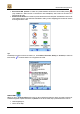
• dial its phone number,
• add its address as a waypoint to the route,
• add it to the Favourites.
Tip:
Tap or in the Search POI screen to select or deselect all points-of-interest at once.
Turn Arrows
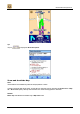
The turn arrows are displayed at the bottom of the screen. The following information is also available:
• the distance to the next turn,
• the remaining travel distance,
• the estimated time of arrival,
• the distance from the first turn to the next turn,
• the number of satellites (“signal strength”),
• the name of the current street.