
User manual





ROUTE 66 Mobile 2006 Symbian UIQ
14
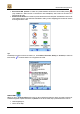
• POI around GPS position to search for points-of-interest around the current GPS position
(only enabled if a GPS receiver is connected to the smartphone) and to add one of them as a
waypoint to the route.
• POI around destination to search for points-of-interest around the point of destination of the route
(only enabled when a route has been calculated or when you are navigating) and to add one of them
as a waypoint to the route.
Tip:
Double tap on an item in the list of results (i.e., in Locations, Favourites, History or Contacts) or select an
item and tap to add its address as a waypoint to the route.
Search POI
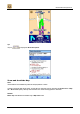
When you are in the Search POI screen and you have selected the radius in which you want to search for
selected categories of points-of-interest, tap Search. In the list of results, tap a point-of-interest in order to:
• start navigating to it,
• show it on the map,