User Guide
Manuals
Brands
Rosewill Manuals
Network Router
RNX-N150HG
31
32
33
34
35
36
37
38
39
40
Table Of Contents
Chapter 1 Overview
1.1 Overview of the product
1.2 Features
1.3 LED Status
Chapter 2 Installation Guide
2.1 Hardware Installation
2.2 Software Installation
2.2.1 For Windows XP
2.2.2 For Windows Vista
2.2.3 For Windows 7
Chapter 3 Configuration Guide
3.1 For Windows XP
3.1.1 Current Status
3.1.2 Profile Management
3.1.2.1 Add or Modify a Configuration Profile
3.1.2.2 Remove a profile
3.1.2.3 Switch another Profile
3.1.2.4 Export a Profile
3.1.2.5 Import a Profile
3.1.2.6 Scan Available Networks
3.1.2.7 Auto Profile Selection Management
3.1.3 Diagnostics
3.1.3.1 Check Driver Information
3.1.3.2 Check Receive and Transmit Statistical Information
3.2 For Windows Vista
3.3 For Windows 7
Chapter 4 WPS Configuration
4.1 PBC (Push Button Configuration) method
4.2 PIN method
4.2.1 Enter a PIN into your AP device
4.2.2 Enter the PIN from your AP device
Appendix A: Specifications
Appendix B: Glossary
Appendix C: FAQ
Wireless High Gain USB
Adapter
R
N
X
-
N
1
5
0
H
G
U
s
e
r
M
a
n
u
a
l
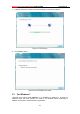
Figure 4-10
2. When
Figur
e 4-7
appears, the WPS configuration is complete.
)
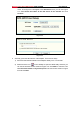
Note:
If you generate a new PIN code for your Router, please enter the
new one instead.
35
1
...
...
37
38
39
40
41
...
...
44