
User Guide


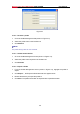


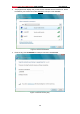
Table Of Contents

Wireless High Gain USB Adapter RNX-N150HG User Manual
Figure 3-8
3.1.2.5 Import a Profile
1. From the Profile Management screen (shown in Figure 3-2), click Import…. Then the
Import Profile will appear below.
2. Browse to the directory where the profile is located.
3. Highlight the profile name.
4. Click Open, the imported profile will then appear in the Profiles List.
Figure 3-9
3.1.2.6 Scan Available Networks
1. Click Scan on the Profile Management screen (shown in Figure 3-2), the Available
Infrastructure and Ad Hoc Networks window will appear below.
2. Click Refresh to refresh the list at any time.
3. Highlight a network name and click Activate to connect to an available network. If no
21