
Operation Manual

- 16 -
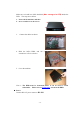
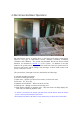
Make sure to install one SATA hard disk (Max. storage size 2TB) inside the
DVR. The steps are as below:
1. Power off the machine, and then
2. use a screwdriver to uncover it.
3. Connect the cables as shown.
4. Hold the SATA HDD, and use a
screwdriver to fix it as shown.
5. Cover the machine.
Note 1: The HDD must be formatted before it can be used to record
video/audio. Please refer to Section 6.6.1
to format the HDD.
Power
Connect DC 12V power source to DC 12V.