
User manual




Page | 8
ROCSTOR
|
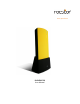
EAGLEROC E9
user manual
QUICK INSTALLATION
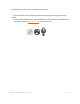
1. Turn ON your computer and wait until it fully boots up to load all programs.
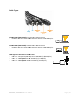
2. Connect one end of the Adaptor cord directly to the Eagleroc and the other end to an AC
outlet, surge protector or battery Backup (UPS).
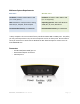
3. Using only one interface cable at a time, select the interface port you wish to use on your
computer. When using FireWire, connect one end of the FireWire cable to the appropriate
FireWire port (FW800 or FW400) of your computer and then the other end to the FireWire
port in the Eagleroc E9. When using USB, connect one end of the USB cable to the USB port
of your computer (or via Power Hub that is connected to your computer) and then the
other end to the USB port in the Eagleroc E9.
4.
NOTE: Although, the AC adaptor MUST BE connected first to both the hard drive and to
electricity; however, the drive will not come “ON” until an interface (USB or FireWire) cable is
fully connected.