User manual
Manuals
Brands
Rocstor Manuals
External Hard Drives
EAGLEROC E9 1TB
31
32
33
34
35
36
37
38
39
40
Page | 32
ROCSTOR
|
EAGLEROC E
9
user manual
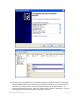
16.
You can also change the name at any time in the future by reach
ing the “Properties” menu
of the Rocstor drive.
17.
You can now Exit or close to return to the desktop.
1
...
...
30
31
32
33
34
...
...
53