
User manual





ROCSTOR
|
EAGLEROC E9
user manual
13.
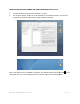
Format: Click on either the “Format” area or the Blue up/down arrows. Select Mac OS
extended (journal).
14.
After selecting the type of format, click the “Partition” tab in the lower right of the
screen. On the next screen, Partition Disk, click “Partitio
user manual
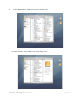
Format: Click on either the “Format” area or the Blue up/down arrows. Select Mac OS
After selecting the type of format, click the “Partition” tab in the lower right of the
screen. On the next screen, Partition Disk, click “Partitio
n” again.
Page | 20
Format: Click on either the “Format” area or the Blue up/down arrows. Select Mac OS
After selecting the type of format, click the “Partition” tab in the lower right of the