
User manual





ROCSTOR
|
EAGLEROC E9
user manual
11.
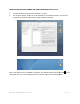
If you are using Tiger, click on Option
Partition Scheme for your Rocstor drive. Suggest you select “Apple Partition Map” then
click OK.
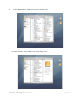
12.
Volume Information: select a name for your drive.
user manual
If you are using Tiger, click on Option
s on the lower center of the window. Select the
Partition Scheme for your Rocstor drive. Suggest you select “Apple Partition Map” then
Volume Information: select a name for your drive.
Page | 19
s on the lower center of the window. Select the
Partition Scheme for your Rocstor drive. Suggest you select “Apple Partition Map” then