
User manual





ROCSTOR
|
EAGLEROC E9
user manual
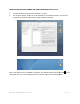
7. On the
left side of the “Disk Utility” menu is a list of available drives. One will be the
Rocstor drive. Click on the icon showing the disk capacity.
8.
You are now in the Rocport menu. Click on the “Partition” tab
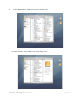
“Current” tab under “Vol
ume Scheme.” A drop down “Partition” menu will appear.
9.
In the “Partition” menu, you may select any number of partitions available under
“Volume Scheme.”
10.
If you are using Panther proceed to #13 below.
user manual
left side of the “Disk Utility” menu is a list of available drives. One will be the
Rocstor drive. Click on the icon showing the disk capacity.
You are now in the Rocport menu. Click on the “Partition” tab
and then click the
ume Scheme.” A drop down “Partition” menu will appear.
In the “Partition” menu, you may select any number of partitions available under
If you are using Panther proceed to #13 below.
Page | 18
left side of the “Disk Utility” menu is a list of available drives. One will be the
and then click the
ume Scheme.” A drop down “Partition” menu will appear.
In the “Partition” menu, you may select any number of partitions available under