
User manual





ROCSTOR
|
EAGLEROC E9
user manual
INSTRUCTIONS FOR PARTITIONING AND FORMATING FROM FAT32 to
1.
Connect the Rocstor drive to the computer via a port.
2.
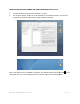
The drive will appear as an icon on the Desktop on the middle right side. The icon will
represent the method of connection (USB, FireWire and SATA).
Note: If the Hard Drive is connected via USB port, the desktop
“Macintosh HD” icon. The
same
user manual
INSTRUCTIONS FOR PARTITIONING AND FORMATING FROM FAT32 to
HFS+:
Connect the Rocstor drive to the computer via a port.
The drive will appear as an icon on the Desktop on the middle right side. The icon will
represent the method of connection (USB, FireWire and SATA).
Note: If the Hard Drive is connected via USB port, the desktop
would indicate
the USB
same
procedures would also apply
to the following steps
Page | 15
The drive will appear as an icon on the Desktop on the middle right side. The icon will
the USB
on the
to the following steps
.