
User manual





Page | 12
ROCSTOR
|
EAGLEROC E9
user manual
Mac
The easiest way to safely unmount an external hard drive is to drag its Finder icon to the Trash.
An alert will notify you if the drive is in use by an application. Close any open documents or
applications on the drive and try again. When the drive’s icon no longer appears on the Finder’s
Desktop and the drive’s activity light is green, you can safely disconnect or turn off the drive.
Reformatting Your Drive
As mentioned previously, all Rocstor hard drives are formatted as blank FAT32 volumes
(otherwise noted on the retail packaging) that are compatible with most modern Windows and
Macintosh operating systems. However, you can use your normal disk management tools to
erase or reformat the drive if needed. For example, Windows users may want to reformat the
drive as an NTFS (new technology file system) volume, or Mac OS X users may wish to reformat
the drive as a Mac OS Extended (Journal) or UFS (Unix file system) volume.
Please note that all of your data will be lost if the volume (Hard Drive) is formatted or reformatted.
Reformatting via PC (Window based computers)
Right-click the Eagleroc drive in the “My Computer” folder, then choose Format. In the dialog
window that appears, choose the desired capacity, file system and allocation unit size and then
click Start.
Reformatting via Mac
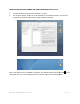
Open Disk Utility (/Applications/Utilities). Select the drive in the list at the left, and then click
the Erase tab. Choose the desired volume format, specify a name, and then click Erase.
Important Note
Any cable (eSATA, FireWire800, or USB 2.0) inserted before the drive is powered on has priority
over the other cables and will be the primary connection method, e.g. if the drive is connected
via FireWire 800 before powering on the drive, data will be transferred via FireWire 800.
The drive should only be connected to a computer via one interface at a time. Connection of the
drive to a computer via two or more interfaces is not recommended and may potentially
damage your Eagleroc drive and data.