
Instruction Manual


Publication 1790-UM002A-EN-P
Module Data, Status, and Channel Configuration for DeviceNet 3-13
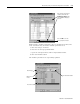
RTD/resistance module parameters may be monitored real time. The
most convenient way to monitor module parameters is to:
a. Click the Groups checkbox.
b. Close the No Group Specified folder
c. Open the I/O Input Values and I/O Input Status folders.
d. Click the Monitor button.
The module parameters are sequentially updated.
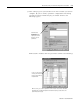
Once module configuration is
complete, click either the
Download or Apply button
and click Yes for the popup
question.
Then click OK to close the
module properties window.
Click the Monitor butto
n
Check Groups
Open these
folders
Close this folder