
User Manual User guide

58 Rockwell Automation Publication 1738-UM005A-EN-P - July 2013
Chapter 5 Configure the Adapter for Direct Connection and Rack Optimization in RSLogix 5000 Software
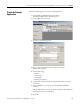
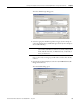
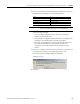
3. Select the 1738-AENT/B adapter from the list and click Create.
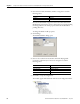
The New Module dialog opens.
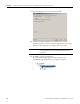
4. Enter values for Name and IP address, noting we used the following values.
.
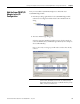
5. Click Change...
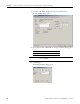
The Module Definition dialog opens.
Name ArmorPoint IO Adapter
IP Address 10.88.70.2
IMPORTANT
Note that the slot field is disabled because the slot is automatically 0
for the I/O adapter.