
User Manual User guide

Rockwell Automation Publication 1738-UM005A-EN-P - July 2013 23
Chapter
4
Configure the Adapter for Direct Connection
in RSLogix 5000 Software
Overview
In this example, a ControlLogix controller communicates with
ArmorPOINT I/O modules via the adapter using a direct connection.
The adapter makes a direct connection to each of the modules referenced by the
data. The modules presented in this chapter use RSLogix 5000 software,
revision 17 and above.
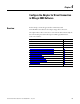
Topic Page
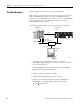
Set Up the Hardware 24
Create the Example Application 25
Configure the I/O Modules 26
Add the Local EtherNet/IP Bridge to the I/O Configuration 26
Add the ArmorPOINT I/O Adapter to the I/O Configuration 29
Add the ArmorPoint I/O Modules to the I/O Configuration 32
Add the Digital Input Module 32
Add the Digital Output Module 35
Add the Analog Current Input Module 37
Add the Analog Current Output Module 40
Edit the Controller Tags 43
Create the Ladder Program 44