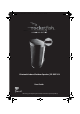
RF-WSP313_13-0633_MAN_V1_ENG.fm Page 1 Friday, August 9, 2013 2:02 PM Bluetooth Indoor/Outdoor Speaker | RF-WSP313 User Guide Before using your new product, please read these instructions to prevent any damage.
RF-WSP313_13-0633_MAN_V1_ENG.fm Page 2 Friday, August 9, 2013 2:02 PM Rocketfish RF-WSP313 Bluetooth Indoor/Outdoor Speaker Contents Introduction .................................................................................................. 2 Features........................................................................................................... 5 Setting up your wireless speaker........................................................... 8 Using your Bluetooth Indoor/Outdoor speaker.........
RF-WSP313_13-0633_MAN_V1_ENG.fm Page 3 Friday, August 9, 2013 2:02 PM Safety information CAUTION:TO REDUCE THE RISK OF ELECTRIC SHOCK, DO NOT REMOVE COVER (OR BACK). NO USER-SERVICEABLE PARTS INSIDE. REFER SERVICING TO QUALIFIED SERVICE PERSONNEL. The lightning flash with arrowhead symbol, within an equilateral triangle is intended to alert the user to the presence of uninsulated dangerous voltage within the product’s enclosure that may be of sufficient magnitude to constitute a risk of electric shock.
RF-WSP313_13-0633_MAN_V1_ENG.fm Page 4 Friday, August 9, 2013 2:02 PM 9) Do not defeat the safety purpose of the polarized or grounding-type plug. A polarized plug has two blades with one wider than the other. A grounding type plug has two blades and a third grounding prong. The wide blade or the third prong are provided for your safety. If the provided plug does not fit into your outlet, consult an electrician for replacement of the obsolete outlet.
RF-WSP313_13-0633_MAN_V1_ENG.fm Page 5 Friday, August 9, 2013 2:02 PM Features • Weather Resistant Speaker–Use inside or outside • Built-in Rechargeable Battery • Versatile Design–Place horizontally or vertically depending on your need • Wirelessly Stream Music from your iPhone, iPad, or other Bluetooth device • aptX® audio decoding – highest Bluetooth stereo audio quality possible Package contents Examine the contents of the box for your Bluetooth Indoor/Outdoor Speaker.
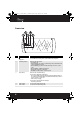
RF-WSP313_13-0633_MAN_V1_ENG.fm Page 6 Friday, August 9, 2013 2:02 PM Front view # Feature Function 1 Press to turn your speaker on or off. Press and hold for two seconds to put the speaker into Bluetooth pairing mode. 2 (On/Off/ Pairing) button Power/Pairing indicator 3 Battery indicator 4 5 Volume + button Volume – button 6 Indicates the status of the speaker.
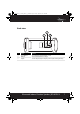
RF-WSP313_13-0633_MAN_V1_ENG.fm Page 7 Friday, August 9, 2013 2:02 PM Back view 1 2 3 # Feature Function 1 2 3 Bass on/off button AUX IN jack DC IN jack Press to turn the bass enhancement feature on or off. Connect an external audio device to this jack. Connect the AC power adapter to this jack to power the speaker and charge the battery.
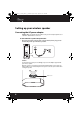
RF-WSP313_13-0633_MAN_V1_ENG.fm Page 8 Friday, August 9, 2013 2:02 PM Setting up your wireless speaker Connecting the AC power adapter Caution: Make sure that the AC outlet matches the system’s AC input requirements of 120/240V~ 50/60Hz before connection. To connect the wireless speaker to an AC power outlet • Plug the AC power adapter into a power outlet, then plug it into the DC IN jack on your wireless speaker.
RF-WSP313_13-0633_MAN_V1_ENG.fm Page 9 Friday, August 9, 2013 2:02 PM Charging the built-in battery This wireless speaker has a built-in Lithium Ion battery to give you battery playback when you can’t use the AC adapter. When the AC adapter is plugged in, the system charges. While charging, the battery indicator lights amber. When fully charged, it turns green. After five minutes, if you don’t turn on the speaker, the indicator turns off and the speaker turns off.
RF-WSP313_13-0633_MAN_V1_ENG.fm Page 10 Friday, August 9, 2013 2:02 PM Adjusting the Volume To adjust the volume: Press the Volume +/- buttons to increase or decrease the volume. Each time you press Volume + or Volume - , the Power/Pairing indicator blinks blue when the volume is changing. When the volume reaches the maximum or minimum setting, the indicator will no longer blink blue. Activating the bass boost You can enhance the bass response of your wireless speaker by turning the bass boost on.
RF-WSP313_13-0633_MAN_V1_ENG.fm Page 11 Friday, August 9, 2013 2:02 PM iii. From General, click Bluetooth. b. For Android Phone/Tablet: i. From your smart phone/tablet home page, click Settings. ii. From the Settings menu, click Wireless and networks. iii. Click to activate Bluetooth. iv. Click Bluetooth settings. 6 On the Bluetooth device, select Rocketfish RF-WSP313 from the list of found devices. 7 On the Bluetooth device, enter 0000 as the PIN, if prompted.
RF-WSP313_13-0633_MAN_V1_ENG.fm Page 12 Friday, August 9, 2013 2:02 PM Reconnecting your device: If you move out of range or turn off the Bluetooth feature on your Bluetooth device, the Bluetooth speaker disconnects from your device. When this happens, the LED will slowly blink on and off. To restore the connection: • Move the music device back into range (within 33 feet), and make sure there is a clear line of sight and there are no obstructions between the Bluetooth speaker and the device.
RF-WSP313_13-0633_MAN_V1_ENG.fm Page 13 Friday, August 9, 2013 2:02 PM Playing music from an external, connected source You can enjoy music from an external source, such as a digital music player, through this wireless speaker. To play music from an external, connected source: 1 Connect an external device to the AUX IN jack on the back of your wireless speaker using the stereo audio cable provided. To an audio device, such as a CD or MP3 player.
RF-WSP313_13-0633_MAN_V1_ENG.fm Page 14 Friday, August 9, 2013 2:02 PM Troubleshooting Please read this User Guide carefully before using your wireless speaker. Check this list for a possible troubleshooting solution before calling for service. Problem Solution No power No sound output via Bluetooth No sound output in AUX IN mode The system powers off automatically Bluetooth connection cannot be established • • • • • • • • • • • • • Make sure that the AC adapter is correctly connected.
RF-WSP313_13-0633_MAN_V1_ENG.fm Page 15 Friday, August 9, 2013 2:02 PM Legal notices FCC Part 15 This device complies with Part 15 of the FCC Rules. Operation of this product is subject to the following two conditions: (1) this device may not cause harmful interference, and (2) this device must accept any interference received, including interference that may cause undesired operation.
RF-WSP313_13-0633_MAN_V1_ENG.fm Page 16 Friday, August 9, 2013 2:02 PM For compatibility between the system and another device with Bluetooth technology, consult the device 's documentation and dealer. In some countries, there may be restrictions on using Bluetooth devices. Check with your local authorities. is a registered trademark of Bluetooth SIG, Inc. Please read the rating label on the back of the system for power input and other safety information.
RF-WSP313_13-0633_MAN_V1_ENG.fm Page 17 Friday, August 9, 2013 2:02 PM One-Year Limited Warranty Rocketfish Products (“Rocketfish”) warrants to you, the original purchaser of this new RF-WSP313 (“Product”), that the Product shall be free of defects in the original manufacture of the material or workmanship for one (1) year from the purchase of the Product (“Warranty Period”). This Product must be purchased from an authorized dealer of Rocketfish brand products and packaged with this warranty statement.
RF-WSP313_13-0633_MAN_V1_ENG.
RF-WSP313_13-0633_MAN_V1_ENG.fm Page 20 Friday, August 9, 2013 2:02 PM www.rocketfishproducts.com call 1-800-620-2790 (U.S. and Canada) or 01-800-926-3010 (Mexico) Distributed by Best Buy Purchasing, LLC 7601 Penn Avenue South, Richfield, MN 55423-3645 USA © 2013 BBY Solutions, Inc. All rights reserved. ROCKETFISH is a trademark of BBY Solutions, Inc. All other products and brand names are trademarks of their respective owners.