
User guide




15
RF-HPL302
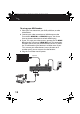
1 Plug the IR emitter cable into the Transmitter.
2 The IR emitter cable has two separate IR emitters, one for
each video source device you want to control. For each IR
emitter, remove the protective cover from the tape on the
emitter and stick the emitter near the IR sensors on your
video sources.
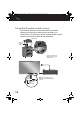
3 Plug the IR receiver cable into the Receiver if your Receiver is
out of view or hidden in a media cabinet. If you can point
your remote directly at the Receiver, you do not need to
connect this cable, go to Use your HD Extender (page 15).
4 Remove the protective cover from the tape on the IR
receiver and stick the IR receiver on the front of your TV, or in
another visible location you can point to with your remote.
Note: Do not place the IR receiver over the IR window of your
TV.
Use your HD Extender
1 Place two AAA batteries (included) into the remote control.
2 Press (power) on the Transmitter and Receiver to turn
them on. The Sync indicators blink while establishing a
connection over the power line. Once connected, the
indicators blink slower (good connection) or light solid
(perfect connection). You can watch video and hear audio
through your TV.
3 Make sure your video device is turned on, then press the
SOURCE 1 or SOURCE 2 button on the remote control or the
Receiver and Transmitter to select the source you want to
view.
4 Turn on your TV and set it to the correct HDMI input.
RF-HPL302_14-0333_MAN_V1_ENG.fm Page 15 Tuesday, April 22, 2014 2:39 PM