
User guide




13
RF-HPL302
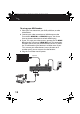
5 Place your Receiver near your TV.
6 Connect the Receiver's HDMI OUT jack to your TV's HDMI IN
jack.
7 Press the Source/Input button on your TV's remote to select
the correct HDMI input.
8 Plug the Receiver into AC power.
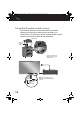
After the receiver and transmitter are turned on, the Sync
indicators blink while establishing a connection over the
power line. After they have connected, the indicators blink
slower (good connection) or light solid (perfect connection).
Even if the light is blinking, you will still be able to receive
video. The system will automatically adjust the video data
rate so that it can be sent over the power line interface.
Note: It's best to connect the AC power cord directly to a wall
outlet. Using a surge protector with noise filtering may decrease
the data rate and may affect the quality of the signal.
RF-HPL302_14-0333_MAN_V1_ENG.fm Page 13 Tuesday, April 22, 2014 2:39 PM