
User guide




12
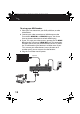
To set up your HD Extender:
1 Place your Transmitter near your DVR, cable box, or other
video device.
2 Connect your video source devices' HDMI output to the
Transmitter's HDMI IN 1 or HDMI IN 2 inputs. You do not
have to connect video devices to both HDMI inputs.
3 If your TV is near your video sources, connect the TV's HDMI
IN jack to the Transmitter's HDMI OUT jack. This connection
will allow you to view your video device(s) on this TV and on
the TV connected to your Receiver in another room. If your
TV is not near your video devices (across the room or in
another room), you can connect it to the Receiver.
4 Plug the Transmitter into AC power.
Optional
RF-HPL302_14-0333_MAN_V1_ENG.fm Page 12 Tuesday, April 22, 2014 2:39 PM