
Instruction manual





Selecting Listening Mode
The listening modes allow you to select the best sound effect for your input
source.
1. Press RECEIVER on the remote controller.
Always press RECEIVER first to change the remote controller to
RECEIVER mode (the mode to operate this unit) since its mode may
be changed to operate another component.
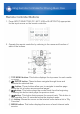
2. Press one of the following buttons depending on your choice from among
the four listening modes.
Pressing a button changes the listening mode to that chosen. Set the
listening mode of your choice by listening to the actual sound.
For details on the types and difference of listening modes, see "Contents
of Listening Modes".
MOVIE/TV button
You can select a mode suitable for movies and TV programs.
Selectable listening modes:
All Ch Stereo
Direct
Dolby Atmos
Dolby D (Dolby Digital)
Using the Listening Modes