
User Manual






58
User's Guide Fireface UCX II © RME
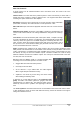
The lowest field shows the current routing target. A mouse click
opens the routing window to select a routing target. The list shows all
activated routings of the current channel by arrows in front of the
listed entries, the current one is shown in bold letters.
An arrow is only shown with an activated routing. A routing is seen as
activated when audio data is sent. As long as the fader is set to −∞
the current routing will be shown in bold letters, but not have an ar-
row in the front.
Trim Gain. After a click on the T-button one channel’s faders are all synchronized. Instead of
changing only a single routing the fader affects all the channel’s active routings. For a better
overview the faders currently not visible are indicated by orange triangles beside the fader path.
When moving the fader the triangles also move to a new position, equalling the invisible faders’
new settings.
Note that the fader button is automatically set to the highest routing gain of all rout-
ings so that best control is offered. The gain (fader knob position) of the currently
active routing (the submix selected in the third row) is shown as white triangle.
Background: TotalMix has no fixed channel fader. In case of the Fireface UCX II
there are 20 mono Aux sends, shown alternately as single fader within the channel
strip. The high number of Aux sends enables multiple and fully independent rout-
ings.
In some cases it is necessary to synchronize the gain changes of these routings. An
example is the Post fader function, where a change of the singer’s volume shall be
performed identical to the volume change of the signal sent to the reverb device, so
that the reverb level keeps its relation to the original signal. Another example is the
signal of a guitar that is routed to different submixes, means hardware outputs,
which gets much too loud during the solo part, and therefore needs to be reduced in
volume on all outputs simultaneously. After a click on the Trim button this can be
done easily and with a perfect overview.
As all channel’s routings change simultaneously when Trim is active, this mode basically causes
the same behaviour as a trim pot within the input channel, affecting the signal already before the
mixer. That’s how this function got its name.
In the View Options / Show the function Trim Gains can be globally switched on and off for all
channels. The global Trim mode is recommended when using TotalMix FX as live mixing desk.
The Context Menu. With a right click on the input, playback and output channels their context
menus provide advanced functionality (these menus are also available in the Matrix, but only
directly on the channel labels). The entries are self-explanatory and automatically adjust to
where the click is performed. On all of these the first entry opens the Channel Layout dialog. The
input channels offer Clear, Copy input, paste the input mix and paste its FX. On a playback
channel Copy, Paste and Clear the playback mix are available. On an output channel Copy and
Mirror functionality for the current submix and copying of the FX settings is offered.