
User`s manual





- -
15
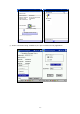
Port”. In this case, the number of com port is 6. And then change to “about” page, there
should be version string shown.
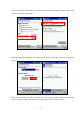
(3) Click the “Bluetooth Manager” in “General” page. Select “New” and “Connect!” to add new
device.
(4) Then the Bluetooth Connection Wizard will be executed. Select “Explore a Bluetooth
device” and click “Next”. Tab the Device frame on the form to start to search.