
Operating instructions




Changing/Confirming Communication Information
216
4
Printing a Confidential Document
This function is designed to prevent unauthorized users from reading your documents.
If someone sends you a document using Confidential Transmission, it is stored
in memory but not automatically printed. To print the document you have to en-
ter the Confidential ID. When your machine has received a confidential docu-
ment, the Confidential File (i) indicator lights.
Important
❒ Before using this function, program your Confidential ID in the Facsimile
Features menu.
❒ If the main power switch is turned off for about an hour, all documents pro-
tected by Memory Lock Reception are deleted. When this happens, the Power
Failure Report is printed so you can confirm which documents have been de-
leted. For details, see “Troubleshooting When Using the Facsimile Function”,
Troubleshooting.
❒ You must program the Confidential ID for Confidential Reception to work.
❒ This function is not available with Internet Fax.
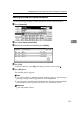
A Confirm that the Confidential File indicator is lit.
B Press [Information].
C Press [Print Confidential RX File].
If no confidential documents have been received, the message “
No recep-
tion file.
” is shown. Press [Exit].
ARY003S