
Operating instructions




Sub Transmission Mode
147
2
Reduced Image Transmission
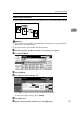
Using this function, your document is sent at a reduced size (93%) with a blank margin on the left.
Important
❒ This function is unavailable with Immediate Transmission, or specified trans-
mission of a stored document.
❒ Image Rotation is unavailable with this function.
A Place the original, and then select the scan settings you require.
B Press [Sub TX Mode].
C Select [Options].
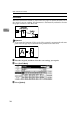
D Press [On] for Reduced Image TX.
Press [Off] if you do not want to do a reduced transmission.
To cancel the option settings, press [Cancel].
E Press [OK] twice.
F Specify the destination, and then press the {Start} key.