
Manual



Netcon (Remote Administration System)
41
Appendix
REVIEWING VIDEO CLIPS
You do not need to install any special software on you personal computer to review video saved as Self-Player files.
The file contains a Clip Player program. Double-clicking the target file starts the Clip Player program.
NOTE: It is suggested that the computer used for the Clip Player program has at least an 800MHz Pentium III
(Intel Pentium Dual Core 2.2GHz recommended). If your CPU is slower than this, video clips recorded at maximum
speed with very high image quality will be played back slowly. Also DirectX 9.0 or higher is required to install,
and the VGA card with 16MB or higher video RAM is recommended for proper operation.
NOTE: You will be asked to enter the password to initiate the Clip Player program if you select Save Password
option when saving recorded video.
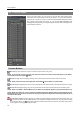
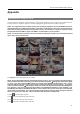
The ClipPlayer Screen displays the clip images.
NOTE: Proper image display depends on the display settings of your PC. If you are experiencing display problems,
click the right mouse button on the background screen and select Properties Settings then set the Color quality
to “32 bit”. Then select Advanced Troubleshoot, and then set the Hardware Acceleration to “Full”. Please
make sure that DirectX version 9.0 or higher has been installed if the display problem continues. To check the
version of DirectX, click Start RUN and type “dxdiag” then hit the enter key which will display DirectX Diagnostic
Tool dialog box. Then move to the Display tab and make sure DirectDraw Acceleration is set to “Enabled”. Test
DirectDraw by selecting the DirectDraw Test button. Please check the driver version of the video card and update
it to the latest version available. If you still have display problems after changing all display settings as described
above, try replacing the video card. Video cards with an ATI chipset are recommended.
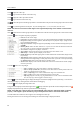
Clicking exits the Player program.
Click to go to the beginning of the video clip.
Click to play the video clip in fast reverse.
Click to go back one frame of the video clip.