
Manual


User’s Manual
18
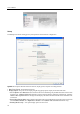
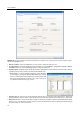
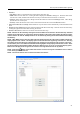
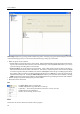
System 2: Set up the modem connection information for remote access, system password, network option, report
function and DVRNS server.
Dial-up Network: Select Use modem if you want to use a modem for remote access.
Security Options: Designate whether password confirmation is required Before setup, Before startup, or Before
shutdown of Netcon. Click the Change button to change the password.
Network Option: Set up the IP port number (from 8000 to 12000) that is used for network connection when receiving
a callback message from a remote site. (REVO PRO Model only)
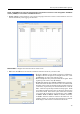
– Event Setup…: Enter the number of emergency events displayed
in the Emergency Event panel (REVO PRO Model Only). Set up
Netcon to sound when events are detected by selecting events from
the list and designating the sound file (.wave) path. You can set
up a different sound for each type of event.
Report Setup: Set up the Use (On or Off) and check intervals (from 1 to 24 hours) of the report function. When using
the report function, Netcon checks on the remote site based on the user-defined interval and reports system status.
DVR Name Service: Set up the IP address and port number (from 10000 to 12000) of the DVRNS (DVR Name
Service) server. The IP address and port number you enter should match the values set during the DVRNS setup of
the remote DVR you want to connect to.