
Manual


User’s Manual
42
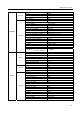
DISPLAY
OSD
Status
Remote Control On
Zoom On
Network On
Freeze & Sequence On
Screen Group On
Free Space On
Date On
Time On
Camera
No. Off
Title On
Record On
Audio On
PTZ On
Transparency 0 (Left)
OSD Margin…
Horizontal 10
Vertical 10
Main Monitor
Sequence
Mode Full Sequence
Interval 3 sec.
Event Monitoring On Off
Enable VGA Enhancement Off
VGA Screen Position…
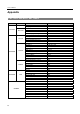
ERROR CODE NOTICES
SYSTEM UPGRADE RELATED CLIP COPY RELATED
No. Description No. Description
0
Unknown error.
0
Unknown error.
1
File version error.
1
Device error.
2
Operating system version error.
2
Mounting failed.
3
Software version error.
5
File already existed.
4
Kernel version error.
6
Not enough space.
100
Upgrade device mounting failed.
7
Creating temporary file failed.
101
Package is not found.
8
Opening disk failed.
102
Extracting package failed.
9
Formatting disk failed.
103
LILO failed.
10
Database has been changed.
104
Rebooting failed.
11
Appending failed.
105
Invalid package.
12
Bad sector.
300
Remote connection failed.
13
No executable file.
301
Remote network error.
14
Opening executable file failed.
302
Remote upgrade is not authorized.
15
Writing executable file failed.
303
Saving remote package failed.
16
Creating image failed.
304
Remote upgrade is cancelled by the user.
400
USB device mounting failed.
401
Reading upgrade package on the USB device failed.
402
Copying upgrade package on the USB device failed.
500
System is busy clip copying.