
Manual



User’s Manual
18
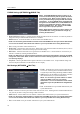
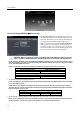
General Settings (RECORD General Tab)
Recycle When Disk Full: Selecting this box records over
the oldest video data once all available storage space has
been used. When the box is not checked, the DVR stops
recording once all available storage has been used.
Codec: Select the codec between H.264 and MPEG-4.
Selecting the new codec displays a message asking you
to confirm whether or not you want to restart the system
because the system must be restarted before applying the
new codec and you will lose all recording data.
CAUTION: When changing the codec all recording data is deleted before applying the new
codec. If you don’t want to delete the recording data, back up it using the clip-copy function.
NOTE: Selecting the H.264 codec and enabling the VGA Enhancement function will cause the recording speed
to be decreased by half. Refer to the Display Setup, Main Monitor Settings section in this chapter for setting
up the VGA Enhancement function.
NOTE: The maximum recording and playback speed when using the H.264 codec is as follows.
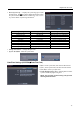
When the DVR is in the Recording Mode only
Disable VGA Enhancement Enable VGA Enhancement
120 ips (100 ips PAL) 60 ips (50 ips PAL)
When the DVR is in the Recording mode and Playback mode at the same time
Recording Speed Playback Speed
60 ips (50 ips PAL) 120 ips (100 ips PAL)
Resolution: Select the recording resolution.
NOTE: The total ips of all camera channels will be limited to 60 ips when set to High resolution and 30 ips when
set to Very High resolution.
NOTE: When set to High or Very High resolution, the maximum recording speed of each camera channel
decreases by half. However the maximum recording speed of 30 ips will be maintained if the number of cameras
that are turned On is two or less.
No. of cameras set to On and High or Very High resolution
0 1 2 3 to 16
─
30 ips 30 ips 15 ips
Record Audio: Selecting the box records audio from up to four inputs when video is recording.
NOTE: When installing more than four observation cameras, only audio sources from cameras connected to
the RJ-12 Video In 1, Video In 2, Video In 3 and Video In 4 connectors will be recorded.