
Manual



Digital Video Recorder
13
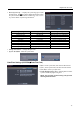
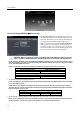
Show System Log…: Displays the system logs (up to 5,000
from the latest). The
icon will be displayed in the last column
for system activities of remote sites. Refer to Appendix – System
Log for the details of system log information.
Log Message Log Message Log Message
Boot Up Setup Export Cancel Clip-Copy End (Local/Remote)
Upgrade (Local) Schedule On Clip-Copy Cancel (Local/Remote)
Upgrade Failure (Local) Schedule Off Clip-Copy Failure (Local/Remote)
Setup Begin Clear All Data (Local) Time Change (Local)
Setup End Format Disk Time Zone Change (Local)
Setup Imported Auto Deletion DISK FULL
Setup Import Fail Search Begin (Local/Remote) Shutdown
Setup Exported Search End (Local/Remote) Restart
Setup Export Fail Clip-Copy Begin (Local/Remote) DISK# BAD
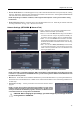
Change Password…: Changes the password.
System Shutdown: Shuts the system down.
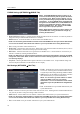
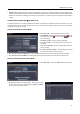
Date/Time Settings (SYSTEM Date/Time Tab)
Date: Set the system date, and select the date format.
Time: Set the system time, and select the time format.
Time Zone: Select your time zone.
Enable Daylight Saving Time: Selecting the box sets the
system to enable daylight saving time.
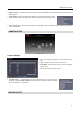
NOTE: The clock will not start running until you have
selecting the Save button.