
Owner's manual




IC Live Users Manual - Models ICL-R & IC215S-R
52
Updating DSP Firmware
The latest 48 kHz DSP rmware les (.bin les) were installed in your array before it was shipped to you, unless you specically requested
96 kHz les be installed.. These les contain the loudspeaker specic EQ, crossover and protection settings for the loudspeaker and are
updated from time to time as the rmware is improved.
If you system was set up to operate at 48 kHz and you want to run at 96 kHz, you will need to install the 96 kHz .bin les for your
loudspeaker(s).
If you are having problems with your system, we may ask you to update the .bin les as part of troubleshooting, To download the latest .bin
les, go to Check for Firmware under the Help pull down menu. See page 49. Be aware that .bin les names which start with RH4... are 48
kHz les; 96 kHz les start with RH9...
Important: When upgrading earlier versions of Microcontroller and DSP rmware to version 1.8.0 it is critical that the Microcon-
troller rmware be installed rst.
These les need to be placed in the “DSP Firmware” sub folder of your RHAON installation (typically “C:\Renkus- Heinz\ RHAON\DSP_
Firmware”).
Step 1: In RHAON select either the Control or Supervise mode and then right-click on the one of the loudspeaker listings in the directory
tree view or on the loudspeakers icon in the main display area and select “Update DSP Firmware…”. The pop up menus are the same
ones we explored on page 51 under Updating Microcontroller Firmware.
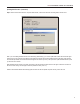
Selecting Update DSP Firmware will open the window shown below. Notice that the program lets you know what rmware is installed in the
loudspeaker.
Step 2: Select the appropriate rmware to download and press “Download”. If no listings appear in the white eld, it’s a sign that you have
not downloaded any .bin les for that loudspeaker from the web and placed them in the DSP Firmware folder.