
Technical information


Section 3 Software Specifications when Using the SH72546RFCC, SH72544R, SH72543R, SH72531, and SH72531FCC
Rev. 2.00 Feb. 18, 2009 Page 78 of 94
REJ10J1938-0200
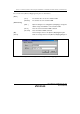
3.2.9 [Configuration] Dialog Box
The [Configuration] dialog box is displayed by selecting [Setup] -> [Emulator] -> [System] from
the menu.
The following explains this dialog box.
Figure 3.14 [Configuration] Dialog Box ([General] Page)