
Technical information





Section 2 Software Specifications when Using the SH7125 or SH7124
Rev. 4.00 Jan.13, 2010 Page 12 of 16
REJ10J1271-0400
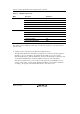
Table 2.7 lists the combinations of conditions that can be set under Ch1 to Ch10.
Table 2.7 Dialog Boxes for Setting Event Conditions
Function
Dialog Box
Address Bus
Condition
(Address)
Data Bus
Condition
(Data)
Bus State
Condition (Bus
State)
Count
Condition
(Count)
Action
[Event
Condition 1]
Ch1 O O O O
[Event
Condition 2]
Ch2 O O O X
[Event
Condition 3]
Ch3 O X X X
[Event
Condition 4]
Ch4 O X X X
[Event
Condition 5]
Ch5 O X X X
[Event
Condition 6]
Ch6 O X X X
[Event
Condition 7]
Ch7 O X X X
[Event
Condition 8]
Ch8 O X X X
[Event
Condition 9]
Ch9 O X X X
Only a break
can be set.
[Event
Condition 10]
Ch10 O X X X
Note: O: Can be set in the dialog box.
X: Cannot be set in the dialog box.