
Technical information







Renesas E10A-USB Emulator
Introductory Guide for SH/Tiny (SH7125)
1. Overview
This introductory guide (application note) is intended for first-time users of the E10A-USB emulator. It provides simple
descriptions regarding the E10A-USB emulator to help the user easily follow a straight path from unpacking of the
emulator to running and stopping of a program without getting lost on the way.
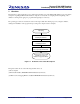
The operating procedures are described in sections 4 through 6. Take the following steps to try using the emulator,
starting from installation of the program and proceeding to the simple execution examples.
Unpacking
Section 4
Installing the Software
Section 5
Installing the Driver
Section 6,
Let's Try Using the Emulator
Now you have successfully
completed a course on
emulator usa
p
rocedures.
g
e
Figure 1.1 Flowchart of Procedure Descriptions
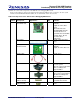
This guide assumes the use of the following machines and tools.
(1) Host computer
(2) E10A-USB emulator (HS0005KCU02H manufactured by Renesas)
(3) SH7125 series debugging MCU board (HS7125EDB01H manufactured by Renesas)
REJ06J0007-0100/Rev.1.00 February 2007 Page 3 of 43