
Technical information







Renesas E10A-USB Emulator
Introductory Guide for SH/Tiny (SH7125)
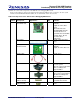
Table 2.2 Components of the SH7125 Series Debugging MCU Board (cont)
Classi-
fication
Component
Appearance
Quan-
tity
Remarks
Hardware Guide pins
2 or 3
*The quantity will differ
according to the supported
device.
Two guide pins are provided
for the SH7125
(PLQP0064KB-A) and
SH7124 (PLQP0048JA-A),
and three are provided for
the SH7125
(PRQP0064GB-A).
Screwdriver
1
User’s manual
1
SH7125 Series Debugging
MCU Board User’s Manual
2.2 Operating Environment
The software products provided together with the E10A-USB emulator operate on the host computer and OS version
shown in table 2.3.
Table 2.3 Operating Environment
Host computer IBM PC/AT with the USB1.1 or USB2.0 (Full-Speed) interface
OS Microsoft Windows
2000 or XP
CPU
Pentium
III or higher-performance CPU
(1 GHz or higher performance recommended)
Memory 128 Mbytes or more (512 Mbytes or more recommended)
HDD Installation disk capacity: 100 Mbytes or more.
Prepare an area at least double the memory capacity (four-times
or more recommended) as the swap area.
CD-ROM drive Required to install the software
Display Monitor resolution: 1024 x 768 or higher
2.3 MCU Board (HS7125EDB01H Manufactured by Renesas)
The SH7125 series debugging MCU board (HS7125EDB01H) supports the Renesas’ SH/Tiny (SH7125) series
microcomputer.
The debugging MCU board is connected to the user system through the IC socket on the user system. The user system
can be debugged under conditions similar to the actual application conditions. The debugging MCU board enables
REJ06J0007-0100/Rev.1.00 February 2007 Page 6 of 43