
Specifications


Table Of Contents
H8SX Family Emulator E6000H
Usage of Realtime RAM Monitoring
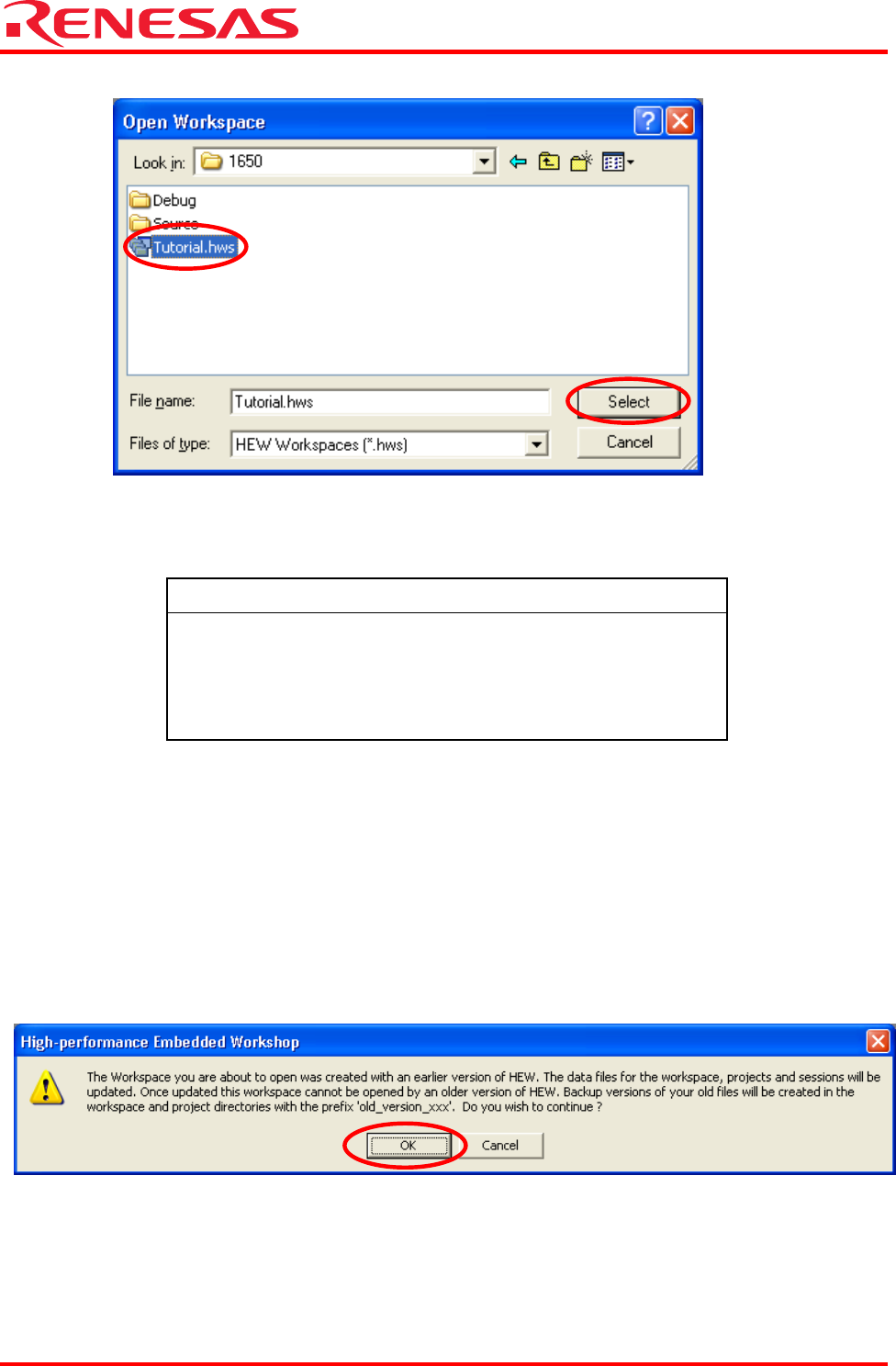
(2) The [Open Workspace] dialog box will appear.
When the software from the CD-ROM of this product has been installed, workspace "Tutorial.hws" is stored in the
folder structure shown below (standard location). Specify the correct location by opening the folders in order. Select the
workspace "Tutorial.hws" and click the [Open] button.
REJ06J0024-0100/Rev.1.00 July 2007 Page 8 of 23
C:\WorkSpace
└Tutorial
└E6000H
└1650
└Tutorial.hws
C:\WorkSpace\Tutorial\E6000H\1650\Tutorial.hws
Note: The above directory may not be specifiable depending on the software version. In this case, select the following
directory.
<High-performance Embedded Workshop installation directory>
\Tools\Renesas\DebugComp\Platform\E6000H\1650\Tutorial
Directory examples:
C:\hew3\Tools\Renesas\DebugComp\Platform\E6000H\1650\Tutorial
C:\hew2\Tools\Renesas\DebugComp\Platform\E6000H\1650\Tutorial
(3) If the workspace version is old, the following dialog box will appear.
To update it to the new version, click the [OK] button.