
User`s manual





11
Section 5 Differences between the MCUs and the Emulator
1. Program area for the E8 emulator
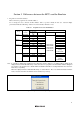
Table 5.1 lists the program area for the E8 emulator.
Do not change this area, otherwise the E8 emulator will not operate normally. In this case, restart the High-
performance Embedded Workshop with the ‘Download emulator firmware’ mode.
Table 5.1 Program Area for the E8 Emulator
ROM Size Program Area for E8 Emulator
Group
Type
Number
Programming
Area
Data Area Vector Area ROM Area
R5F21102 8 KB - -
R5F21103 12 KB - -
R8C/10
R5F21104 16 KB - C000h-C7FFh
R5F21112 8 KB - -
R5F21113 12 KB - -
R8C/11
R5F21114 16 KB - C000h-C7FFh
R5F21122 8 KB 4 KB -
R5F21123 12 KB 4 KB -
R8C/12
R5F21124 16 KB 4 KB 2000h-27FFh
or [Note]
C000h-C7FFh
R5F21132 8 KB 4 KB -
R5F21133 12 KB 4 KB -
R8C/13
R5F21134 16 KB 4 KB
FFE4h-FFE7h,
FFE8h-FFEBh,
FFECh-FFEFh,
FFF4h-FFF7h,
FFF8h-FFFBh
2000h-27FFh
or [Note]
C000h-C7FFh
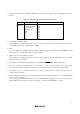
Note: If your MCU is R5F21124 or R5F21134, the dialog box shown in Figure 5.1 is displayed when starting up the
High-performance Embedded Workshop. Select the location of a program for the E8 emulator with this dialog box.
The location of the program area is 2000h-27FFh and C000h-C7FFh when selecting ‘Data Flash Area’ and ‘User
Flash Area’, respectively.
When the High-performance Embedded Workshop is started with the ‘Does not download emulator firmware’
mode, select the area where the firmware has been written to previously.
Figure 5.1 [Firmware Location] Dialog Box