
Operating instructions





8
Display zones and button funcitons
P : 25 R : 01 / 01
SENT 00000000
21. JAN 2009 14 : 47
CLOCK NO/TXT NEXT MODE
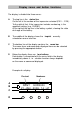
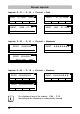
The display is divided into three zones:
A The top line is the status line
On the left is the number of the impression selected (P:01 ... P:29) .
To the right of that, if the impression includes numbering, is the
repetition setting (e.g. R:02/02) .
At the right of the top line is the battery symbol, showing the state
of charge of the battery.
B The middle of the display shows the imprint currently
selected on one or two lines
C The bottom line of the display contains the menu bar
The menu items and commands displayed here can be selected
by pressing the appropriate button.
D Below the display there are four buttons
Each button is associated with the menu field in the display
immediately above it, i.e. a button function always depends
on the menu or command displayed.
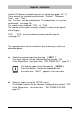
Example of a display:
A
B
C
D
Pre-text Numberer