
Operating instructions





7
Insert ink cartridge
When necessary press repeatedly [ MODE ] until menu item
"INKJET" is displayed on the lower display line
Press [ INKJET ] : The print carriage now automatically
moves to the middle of the equipment for easier handling
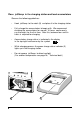
Remove ink cartridge from packaging and remove protective film
from the ink cartridge
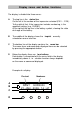
Hold the small felt plate provided with
the felt-side on the ink cartridge nozzles
for about 2 seconds until there is
some ink on the felt
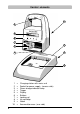
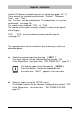
Push the locking rail (7) back on the print carriage and insert
the ink cartridge with the handle strip (8) in the print carriage
pointing to the operator
Pull the locking rail forward again (7) until it engages
Press [ INKJET ] : The print carriage moves back
to its original position
7
8