
Operating instructions






22
continuation see next page
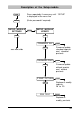
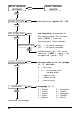
Activation of an imprint (01 ... 29)
Add imprint(s) to favourites list
Only imprints marked 'ON' are shown
when [ NEXT ] is pressed
(see also page 9, Imprint selection)
ON = all imprints selectable
OFF = no imprints selectable
Individual imprints (01 ... 29) can be
shown with [ NEXT ] (setting = ON)
or suppressed (setting = OFF)
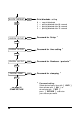
Cleaning mode of the ink cartridge
(0 ... 3) adjustable
0 = no rinsing
1 ... 3 = rinsing inside of the
^ charging station
1 = regular rinsing
2 = medium rinsing
3 = intense rinsing
Language (0 ... 9)
0 = German 5 = Portuguese
1 = French 6 = Flemish
2 = English 7 = Norwegian
3 = Italian 8 = Swedish
4 = Spanish 9 = Danish
STAMP PICTURE
SET STAMP PICT
SETUP - MODULE
SETTINGS
SEL ST PICT ALL
LANGUAGE
CALL
NEXT
VARY
CALL
NEXT
NEXT
NEXT
NEXT
VARY
CLEAN INTERVAL
NEXT
VARY
SETUP - MODULE
UPDATE