
Operating instructions





11
Changing text blocks
Entry of characters:
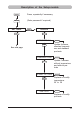
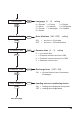
Select the desired stamp picture (P:26 ... P:29)
Press [ NO / INC ] :
The upper line of the display shows ‘ INPUT - MODI TEXT 01 ’
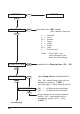
INPUT - MODI TEXT 01 = Text block of the upper line:
This is only an indication,
printed is the set
MS - Level
(see page 10 and 12)
INPUT - MODI TEXT 02 = Text block of the lower line:
This is the display of the
printable block
To vary between the input fields use [ NEXT ]
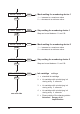
Press [ VARY ] to select the displayed text block for input
or modification
Press [ DEC ] or [ INC ] to input the characters
Following characters are available:
0 ... 9 A ... Z as well as following special characters:
Ç Ä Å É Æ Ö Ü £ Ø Ñ Á
À ¥ Ê È Ó Ú € Í $ & * +
, - . / : @
Press [ RIGHT ] to select the single input digits
Press [ RETURN ] to return to the previous menu
i
Hinweis