
System information
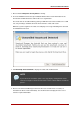
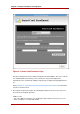
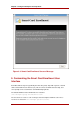
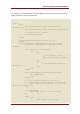
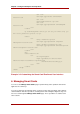

The following is an extract from the default UI HTML file, and it includes comments on how you
might customize it to suit your requirements.
<html>
<head>
<meta http-equiv="Content-Type" content="text/html;
charset=utf-8">
<link rel=stylesheet href="/home/style.css" type="text/css">
<!-- Change the title if desired -->
<title>Enrollment</title>
</head>
<script type="text/JavaScript" src="/home/util.js">
</script>
<body onload="InitializeBindingTable();" onunload=cleanup();>
<progressmeter id="progress-id" hidden="true" align =
"center"/>
<table width="100%" class="logobar">
<tr>
<td>
<!-- Use customized logo here... -->
<img alt="" src="/home/logo.jpg">
</td>
<td>
<p class="headerText">Smartcard
Enrollment</p>
</td>
</tr>
</table>
<table id="BindingTable" width="200px"align="center">
<tr id="HeaderRow">
</tr>
</table>
<!-- Insert customized descriptive text here. -->
<p class="bodyText">You have plugged in your smart card!
After answering a few easy questions, you will be
able to use your smart card.
</p>
<p class="bodyText">
Now we would like you to identify yourself.
</p>
<table>
<tr>
<td><p >LDAP User ID: </p></td>
Customizing the Smart Card Enrollment
29