
Technical data



Version 3.0
©2011-2012 RED.COM INC. 955-0002_v3.0, REV-A
118 118
KEY SOURCE
Use this menu to select the device to program. Options at this time are:
• Brain
• Side Handle
• Bottom Handle
• Side SSD/CF
• LCD on Brain
• Lens
• LCD on Pro I/O
• EVF on Brain
• EVF on Pro I/O
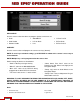
USER KEY
Use this menu to select and program the camera user keys (buttons).
NOTE: To reset keys to default settings, go to RESTORE. A reboot of the camera is necessary to
restore defaults.
NOTE: Multiple keys can be programmed to the same action.
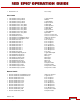
Default settings by device are listed below.
- “Down” indicates pressing of the key.
- “Side CF” refers to the Side SSD Module.
- “Brain LCD” refers to the EVF/LCD being
plugged into the brain EVF/LCD connector.
- “Tele Level” refers to the +/- rocker switch.
- “North, South, East, West” refers to the
Direction keys (Up, Down, Left, Right) on the
Navigation Group.
- “Rotary Jog” refers to Scroll Wheel on the
Navigation Group.
- “Rotary Front” refers to Adjustment Ring on
Side Handle near LCD.
WARNING: IT IS NOT ADVISABLE TO REMAP THE NAVIGATION KEYS (UP, DOWN, LEFT, RIGHT,
SELECT (ENTER), OR MENU) ON THE SIDE HANDLE AS IT IS THEORETICALLY POSSIBLE TO
GET INTO A SITUATION WHERE IT IS NOT POSSIBLE TO RESTORE THE FACTORY KEY PRESET
ANYMORE IF NO TOUCH SCREEN IS ATTACHED TO THE SYSTEM.
Brain
• Brain GPI In High Record Start
• Brain Record Full Button Down Toggle Record