
User manual






LOGO Mobile Phone User Manual
___________________________________________________________
____________________________________________
© 2010 Real Phone Corporation. All Rights Reserved. PAGE 6
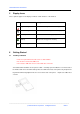
5 Display Icons
These symbols appear on the display to indicate certain functions of the handset.
Icon Name Description
Signal Strength Indicates the strength of the wireless signal.
Voice Message Indicates of a new coming voice message(s).
Message Indicates there are message(s) in your mailbox.
Battery Indicates the energy level of battery.
Voice Recognition Indicates voice recognition is activated.
6 Getting Started
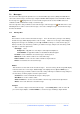
6.1 Installing a SIM Card
Please keep the SIM card out the reach of small children。
Be careful not to bend the SIM Card.
Do not let the SIM card come in contact with dust or moisture.
To install the SIM card make sure the phone is OFF. Carefully open the rubber boot on the left side of
the handset and remove the SIM card tray. Place the SIM card contact side up in the tray and push the
tray with the SIM card gently back into the slot on the left side of the phone. Replace the rubber boot
securely.