
User manual






LOGO Mobile Phone User Manual
___________________________________________________________
____________________________________________
© 2010 Real Phone Corporation. All Rights Reserved. PAGE 5
2 What’s in the Box
Your LOGO Mobile Phone includes the following:
o Handset with embedded battery
o Travel battery charger
o Quick Start Guide
It may also include the following optional items
o Ear bud headset
o Storage pouch
o SIM Card
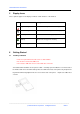
3 Handset Layout
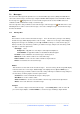
4 Keypad
Icon Name Description
Left soft Key Implements the function displayed in lower left corner of the display
Right soft Key Implements the function displayed in lower right corner of the display
OK Key
Confirm or choose a screen selection; also used to access the Virtual
Keypad from the main screen.
Up Key
From main menu press Up Key to enter Phonebook Browse menu; also
used to set volume, browse options, or move the cursor.
Down Key
From main menu press Down Key to enter Phonebook Browse menu;
also used to set volume, browse options, or move the cursor.
Send Key
Initiates an outgoing call, Answers an incoming call, and accesses the
Call Register
End Key
1) Press the key for 2 seconds to power on or off.
2) Press the key to terminate a call.
3) Press to return to the main screen.