User Manual LOGO Mobile Phone Models: R11C and R12C © 2010 REAL PHONE CORPORATION ALL RIGHTS RESERVED VERSION 2010.
LOGO Mobile Phone User Manual Welcome to the LOGO Mobile Phone The LOGO Mobile Phone from Real Phone Corporation is the world’s thinnest and lightest mobile phone. It is designed for convenient use in places or during activities where a conventional mobile phone would not be appropriate. The LOGO is also designed to allow a large front area of the handset to display a prominent image or “LOGO”, hence the name.
LOGO Mobile Phone User Manual Section Page 1 Emergency Use and Safety Considerations................................................4 2 What’s in the Box ..........................................................................................5 3 Handset Layout .............................................................................................5 4 Keypad ...........................................................................................................5 5 Display Icons..................
LOGO Mobile Phone User Manual 1 Emergency Use and Safety Considerations Any user can make a public emergency call. After powering on the user can start the emergency call directly using the virtual keypad to enter the 911 number. If the phone does not have a SIM card inserted use the SOS left soft key. Note:Depending on the network status, an emergency call has a higher priority with respect to normal calls. Emergency calls should only be made when necessary.
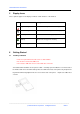
LOGO Mobile Phone User Manual 2 What’s in the Box Your LOGO Mobile Phone includes the following: o o o Handset with embedded battery Travel battery charger Quick Start Guide It may also include the following optional items o o o 3 4 Ear bud headset Storage pouch SIM Card Handset Layout Keypad Icon Name Left soft Key Right soft Key Description Implements the function displayed in lower left corner of the display Implements the function displayed in lower right corner of the display Confirm or c
LOGO Mobile Phone User Manual 5 Display Icons These symbols appear on the display to indicate certain functions of the handset. Icon Name Description Signal Strength Indicates the strength of the wireless signal. Voice Message Indicates of a new coming voice message(s). Message Indicates there are message(s) in your mailbox. Battery Indicates the energy level of battery. Voice Recognition Indicates voice recognition is activated. 6 Getting Started 6.
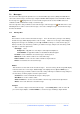
LOGO Mobile Phone User Manual 6.2 Charging the battery The handset contains a rechargeable Lithium-Ion battery. Although the battery will be partially charged to get proper performance a new phone should be fully charged before it is used. To charge the battery carefully open the rubber boot on the right side of the phone. Insert the plug from the charger with the black side facing up into the charging jack.
LOGO Mobile Phone User Manual 6.5 Virtual Keypad The LOGO Mobile Phone has no alphanumeric keypad. If conditions, like a very noisy environment, prevent the use of the voice recognition, and the number needing to be called has not been previously recorded in the phone, the LOGO has a virtual keypad that can be used to enter the number. To access the Virtual Keypad press the OK key from the main screen.
LOGO Mobile Phone User Manual also be turned on from the Profile screen in the Settings menu. 6.10 Adjusting the Volume During a call you can adjust the receiver or speaker volume with the up and down scroll keys. During a call, you can press left soft key and select Mute in the Call Menu to silence the microphone. To restore the normal call function, select un-mute in the C all Menu.
LOGO Mobile Phone User Manual 7.2 Messages Selection of the Message menu provides access to the Short Message Service (SMS); the LOGO Phone can receive text messages, send messages using the READY TEXT templates and send numbers. When the message icon displayed on the screen a new message has been received. If SMS alert tone is enabled tone will sound with the receipt of a new message. If the message box is full, you will not receive new messages.
LOGO Mobile Phone User Manual 7.2.3 Voice Mail Voice Mail is a feature offered by the wireless carriers. If Voice Mail is offered by the carrier providing the SIM Card in your Phone then refer to their instructions for setting up and using the voice mail service. Listen to Voice Mail: This function allows the handset to directly access the carrier’s voice mail system. Voice Mail Edit: This menu is used to set up the Voice Mail service.
LOGO Mobile Phone User Manual OK key. Then press “Save Number” and the Virtual Keypad will appear with the selected number. Press “Accept”. At the prompt “Record Voice Tag” press the left soft key “Start” and record the identifying name for the selected number. After recording the Voice Tag a confirmation request will appear to confirm the name or allow it to be re-recorded.
LOGO Mobile Phone User Manual 7.5 Settings The Settings menu allows the user to set the parameters for numerous functions and conditions of the handset. By utilizing the settings the users can tailor the handset’s operation in the most convenient way for their particular use. 7.5.1 Phone Settings Display Settings LCD Contrast: Sets the contrast of the display screen, press up and down keys to adjust. Back Light: Sets the duration of the display backlight to 15 or 30 seconds, or “Always On.
LOGO Mobile Phone User Manual Phone Information By selecting this option the following information is displayed: Telephone Number - of the SIM Card currently installed in the handset Serial Number - needed for a warranty claim Model Number - needed for customer service assistance FCC ID - the certification number filed with the FCC IMEI number - necessary for SIM Card activation Keypad Lock Sets the time period for the automatic keypad lock. The default setting is Disabled.
LOGO Mobile Phone User Manual Network Select Mode Auto: When selected the handset will select the with the greatest signal strength. Manual: Allows the manual section of available networks. 7.5.3 Call Duration Outgoing Duration: Displays the total time of all outgoing calls since the last reset. Incoming Duration: Displays the total time of all incoming calls since the last reset. Last Call Duration: Displays the total time of the last call made or received.
LOGO Mobile Phone User Manual 7.6 Tools Alarm: 8 Allows setting of up to 3 alarms Calendar: Accesses the monthly calendar Product Certifications The Marks from CE on the handset and the battery charger are shown below: REAL PHONE CORPORATION declares that this product complies with the essential requirements and other relevant provisions of the European Directive (1999/5/EC of the European Council).
LOGO Mobile Phone User Manual 9 Trouble Shooting Guide PROBLEM POSSIBLE SOLUTION Battery will not charge Make sure the battery charger plug is securely connected to the handset and the charger is plugged into a working power source. Phone will not turn on Make sure the battery cutoff switch under the right rubber boot is in the “on” position (the up position). Cycle the switch to off then back to on to make sure it is in the correct position.