
AUDIO/VIDEO RECEIVER User's Guide


Table Of Contents
- Table of Contents
- First Things First
- Operating the Receiver
- Tour of the Receiver
- Programming the Remote
- Programming the Universal Remote
- Programming the Universal Remote to Control a TV
- Programming the Universal Remote to Control a VCR
- Programming the Universal Remote to Control An Audio Component
- Programming the Universal Remote to Control a Cable Box
- Programming the Universal Remote to Control a Laserdisc Player
- Programming the Remote to Control an RCA DSS® Receiver
- Programming the Universal Remote to Control a Satellite
- Programming the AUX Button on the Remote
- Appendix A: Connecting Your Receiver
- Things to Know Before Connecting the Components
- Using the Subwoofer Connections
- Connecting a TV and VCR
- Connecting an RCA DSS® Receiver
- Connecting a Laserdisc Player
- Connecting a Second VCR
- Connecting a Camcorder or Video Camera
- Connecting a Compact Disc Player
- Connecting a Tape Deck or Minidisc Player
- Connecting Antennas
- Connecting Speakers
- Main Speakers
- Rear Speakers
- Center Speaker
- Connecting Speakers to the Receiver
- Connecting The Subwoofer
- Appendix B: Speaker Placement
- Appendix C: Troubleshooting Guide
- Appendix D: Care and Cleaning
- Appendix E: FCC Information
- Appendix F: Limited Warranty
- Appendix G: Equipment Specifications
- Appendix H: Preset Station List Form
- Index
40
Appendix A: Connecting the Receiver
AUDIO
RECEIVER
RCA DSS
RECEIVER
SATELLITE DISH
OUT TO TV
CH3
CH4
L
S-VIDEO
SATELLITE
IN
VIDEOR
AUDIO
IN FROM ANT
IN OUT
IN OUT
IN OUT
1
2
VIDEO
SUB WOOFER
OUT
AUDIO
SOURCE
VCR 2/
LD
MONITOR
OUT
CD TAPE/MDTV
VCR 1 DSS
VCR 2/
LD
VCR 1 DSS
AUDIO
AUDIO
L
R
L
R
(MONO)
TO TV S-VIDEO
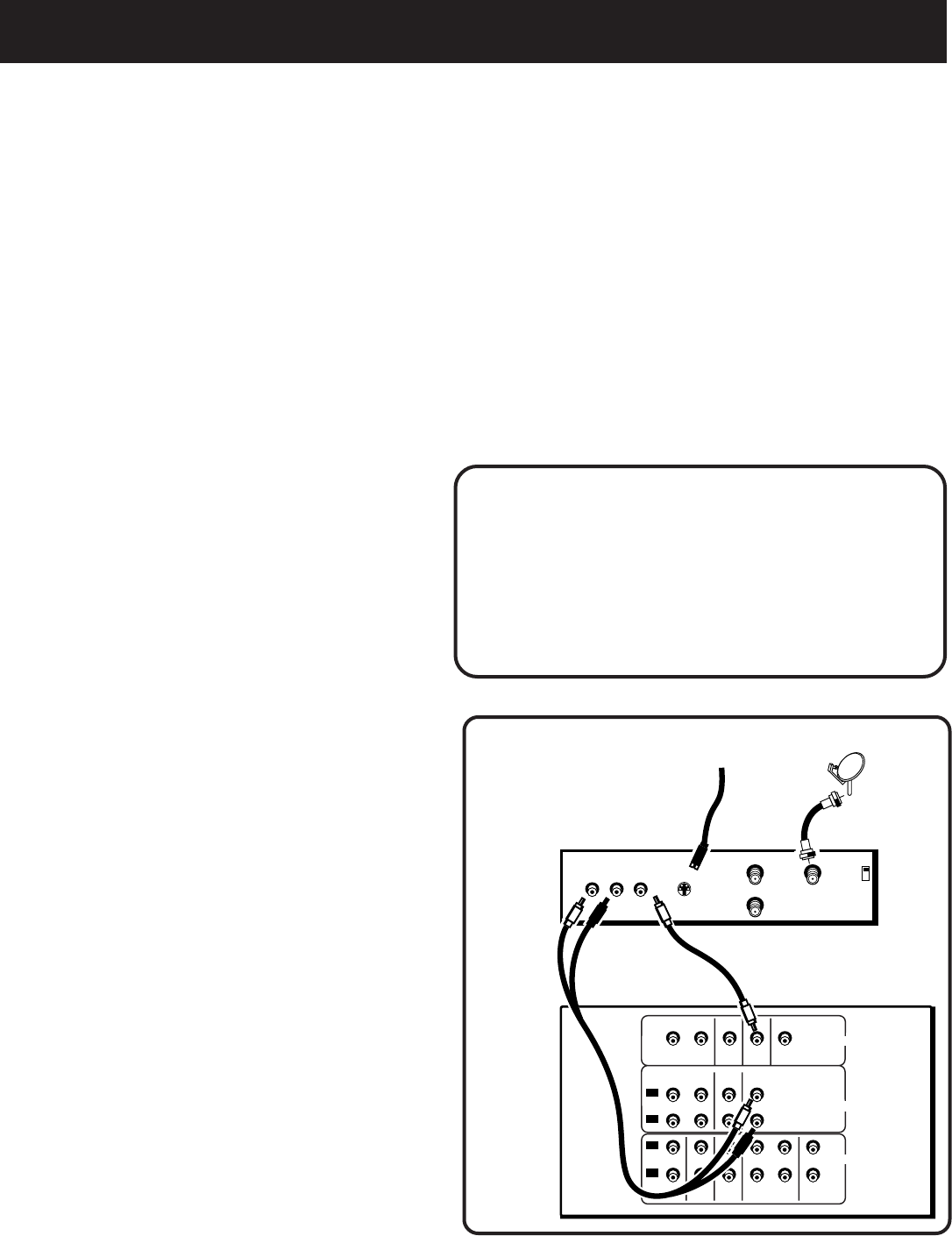
RCA DSS® Receiver
This connection provides
• stereo or surround sound from programs broadcast
in stereo
• stereo sound from the RCA DSS
®
receiver.
To use this connection, you
must have
• (1) paired (red/white) stereo cable
• (1) single (yellow) video cable
• (2) coaxial cables
To Connect
1. Connect the cables as shown in the
diagram below.
Using This Connection
To watch TV programs in stereo
1. Press TV and tune to a channel.
To watch DSS programming
1. Press DSS•CABLE.
2. Tune to a channel.
3. Follow the instructions in the
RCA DSS
®
User’s Guide.
Do not stack electronic components or other
objects on top of the DSS receiver. The slots
on top of the receiver must be left uncovered
to allow proper airflow to the unit. Blocking
the airflow to the unit could impair
performance or damage your receiver and
other components. Also, do not stack the DSS
receiver on top of a “hot component” such as
an audio power amplifier.