
AUDIO/VIDEO RECEIVER User's Guide
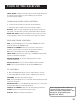

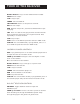


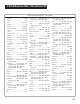

Table Of Contents
- Table of Contents
- First Things First
- Operating the Receiver
- Tour of the Receiver
- Programming the Remote
- Programming the Universal Remote
- Programming the Universal Remote to Control a TV
- Programming the Universal Remote to Control a VCR
- Programming the Universal Remote to Control An Audio Component
- Programming the Universal Remote to Control a Cable Box
- Programming the Universal Remote to Control a Laserdisc Player
- Programming the Remote to Control an RCA DSS® Receiver
- Programming the Universal Remote to Control a Satellite
- Programming the AUX Button on the Remote
- Appendix A: Connecting Your Receiver
- Things to Know Before Connecting the Components
- Using the Subwoofer Connections
- Connecting a TV and VCR
- Connecting an RCA DSS® Receiver
- Connecting a Laserdisc Player
- Connecting a Second VCR
- Connecting a Camcorder or Video Camera
- Connecting a Compact Disc Player
- Connecting a Tape Deck or Minidisc Player
- Connecting Antennas
- Connecting Speakers
- Main Speakers
- Rear Speakers
- Center Speaker
- Connecting Speakers to the Receiver
- Connecting The Subwoofer
- Appendix B: Speaker Placement
- Appendix C: Troubleshooting Guide
- Appendix D: Care and Cleaning
- Appendix E: FCC Information
- Appendix F: Limited Warranty
- Appendix G: Equipment Specifications
- Appendix H: Preset Station List Form
- Index

20
Tour of the Receiver
If you have questions about the
use of the remote buttons with
another component, refer to the
component’s user’s guide.
GUIDE•RDM For some models, brings up 12 small pictures
(previews of the next 12 channels in the channel list). Press
again to turn off channel guide.
INPUT•SEEK For some TV models, toggles through the
available input sources.
MENU/PROGRAM For some models, stores channels in the
TV’s memory.
MOVE arrows In some models, when using PIP, moves the
small picture to another corner of the screen. Also, used for
menu navigation in some TV models.
Number Buttons Let you enter channel numbers and time
settings when needed.
PIP Turns on and off picture-in-picture on most RCA TV
models with PIP.
POWER Turns the TV off.
PREV CH•DISC Returns to the previous channel.
RESET•REP Returns picture quality controls to their
original settings.
SKIP Press once before changing channels and the TV waits
30 seconds before returning to the original channel. Press
repeatedly to increase the time.
SWAP PIP Swaps the main picture in the PIP window.
TV Turns on the TV and puts the remote in TV mode.
TV MENU Displays the TV’s on-screen menus.
VCR Controls
AUX If programmed, turns on another VCR brand and puts
the remote in VCR mode.
CHAN up and down Tunes to the next or previous channel
when watching TV through the VCR.
CLEAR Resets the tape counter and corrects entries when
programming the menus.
DISPLAY Displays channel, time and counter information on
the screen.
FF Fast forwards a tape. Also, searches forward while a tape
is playing.
INPUT•SEEK For some VCR models, selects line input
or tuner.
MENU/PROGRAM Displays the on-screen
programming menus.