
User's Guide




31
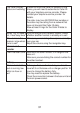
“The Caller
Display
feature isn‟t
working”
In
order
to
utilize
the
Caller ID features
of this
phone,
you will
need
to
subscribe
to
Caller
ID
with your
telephone service
pr
ovider
.
Please
contact your
telephone service provider
for
details.
The caller
may
have BLOCKED
their
number
or
the
caller
may be
calling
from a
network
that
does
not transmit the
Caller ID
data.
Allow
at
least
2
rings
for the
Caller ID
data to
display.
“When
I try to
make
a
call,
I
hear
busy tone”
If
you‟re using
a
multi-handset system,
check
whether
another
handset is
already on a call.
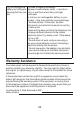
“The volume
in the
earpiece is
low when
I‟m on a call”
Make sure you‟re holding
the
earpiece
correctly
over
your
ear
.
Adjust
the
volume using
the
navigation
key.
Intercom
and
transfer
“I can‟t
transfer
a call”
Make sure
the other
handset is
in
range
of the
base unit.
Make sure
you are
dialing
the
correct number
f
o
r
the other
handset
.
Battery
“The
handset‟s
ba
tt
e
ry
pack is running
low
within an hour or
tw
o”
Before
you first
use
the
handset
,
you should
have
left it on the
base
unit or
charger
pod for 16
hours
to
charge
the battery fully.
You
may
need
to
replace
the battery.
Check
the
connection between
the
base
unit and
the
main
power
sock
et
.