
User Manual


28 | For gamers by gamers™
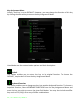
Lighting Tab
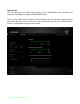
This tab allows you to adjust the intensity of the Switchblade User Interface and
keyboard’s backlight by using the BRIGHTNESS slider.
You can also enable Razer Synapse to automatically switch off all device lighting when
the system display is turned off or when the system has been idle for a certain amount
of time, customizable using the slider below.