
Specifications




Chapter 5 - Autolocation and Loop Functions
ADAT LX20 Reference Manual 41
CHAPTER 5
AUTOLOCATION AND
LOOP FUNCTIONS
The LX20 lets you concentrate on making music by automating several common
processes, including location, recording, and playback.
AUTOLOCATION
Autolocation is the process of having the tape transport search for a point on the
tape that was previously marked as an autolocation point. After finding the
specified autolocation point, the tape “parks” at that point (or begins playback).
RETURN TO ZERO
To return to the beginning of the tape (0:00:00.00) at any time, press the LOCATE 0
button.
LOCATE POINTS
You can store 4 Locate Points, (specific tape locations) either “on the fly” while the
transport is engaged, or when the transport is stopped. Typically, these locations
are beginnings of verses, choruses, bridges, solos, etc. to make it easy to find any
section of a song. Locate points can also be edited.
To store a Locate Point:
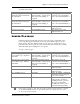
Operation You press… You see…
Initiate Set Locate Press and hold SET LOCATE The LOCATE indicator will
appear in the display,
followed by a flashing dash
(–)
Assign Locate Point While holding SET LOCATE,
press one of the LOCATE 1 -
LOCATE 4 buttons
The display shows the
selected Locate Point number
next to the LOCATE indicator
To recall a Locate Point:
Operation You press… You see…
Recall Locate Point Press one of the LOCATE 1
through LOCATE 4 buttons.
Either the FFWD or REWIND
LED will light. When the
locate function completes, the
transport stops, and the STOP
LED lights.
Recall Locate Point, then Play With Auto Play selected (see
next section), press one of the
LOCATE 1 through LOCATE 4
Either the FFWD or REWIND
LED lights. When the locate
function completes, the